Why Should Businesses Get a Blue Tick on WhatsApp API?
Building trust online is more crucial than ever, especially with scammers and fake accounts impersonating businesses and public figures. Getting a WhatsApp-verified badge (Blue Tick) assures customers and followers that they are interacting with a real, credible account.
The adoption of WhatsApp Business API among SMBs has increased by 60% in the last year, highlighting its growing importance for businesses.
From local startups exploring a WhatsApp marketing service provider in Ahmedabad to pan-India brands, the demand for verified accounts has grown across industries.
If you’re wondering how to get the blue tick on WhatsApp, this guide will walk you through both organic and paid verification options, eligibility requirements, and the step-by-step process to get the blue tick.
WhatsApp verification is not just a status symbol; it provides businesses with instant credibility, better engagement, and brand protection against impersonation. Earning the WhatsApp Business Verified Badge further solidifies your business’s legitimacy and builds customer trust on the platform.
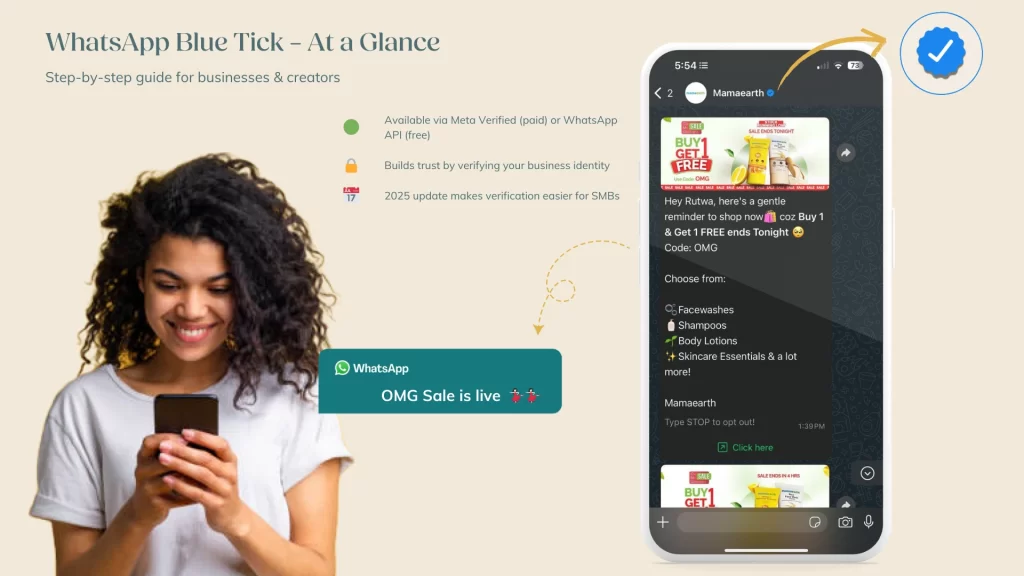
As shown in the image above, WhatsApp displays a blue tick on verified business accounts, helping users recognize authentic profiles at a glance.
Take this short quiz to find out how well you understand WhatsApp verification—and why it can boost your brand’s trust and engagement.
What is WhatsApp Blue Tick Verification?
Learning how to get a Blue Tick on WhatsApp starts with understanding that verification is more than just a badge; it’s a mark of authenticity approved by Meta.
WhatsApp verification is a process that confirms the authenticity of a business account on WhatsApp. Once verified, your account receives a blue tick badge next to your business name, signaling that your profile has been reviewed and approved by Meta. This badge helps customers instantly recognize your business as legitimate, giving them the confidence to engage with your messages, offers, and services.
How to Get Blue Tick on WhatsApp: What’s New in 2025?
Previously, WhatsApp verification was only available through the free API verification process. This method required API access and granted businesses a green tick, proving official recognition. However, this option was restricted to large businesses.
Now, WhatsApp has introduced WhatsApp blue tick verification, making verification more accessible.
- API users still follow the organic verification process, but their tick is now blue instead of green.
- WhatsApp Business app users (small businesses & entrepreneurs) can now get verified through a paid subscription.
With these updates, more businesses can explore how to get a blue tick on WhatsApp without relying solely on API access. This means even small businesses can verify their accounts without needing API access, opening the door to better trust and engagement.
⚠️ New Requirement for API Users:
- To apply for the WhatsApp Blue Tick via API (the free route), your account must first be eligible and approved by Meta.
Only after this internal review will you see the “Submit Request” button inside WhatsApp Manager. - If you’re using a BSP (like WATI, Interakt, etc.) and don’t see the submission option, it means Meta hasn’t granted your account eligibility yet. You’ll need to wait until they do; you cannot manually trigger this process.
Note: API users are not eligible for Meta Verified (paid verification). That is exclusive to WhatsApp Business app users.
Can You Still Get a Green Tick on WhatsApp?
The Short Answer? No.
If a business was previously verified under the old system, its tick has now changed from green to blue.
However, the verification process for API users remains the same; they can still apply for free organic verification, but they will receive a blue tick instead of a green one.
What’s new?
WhatsApp now allows smaller businesses and entrepreneurs to get verified via Meta Verified: a paid verification service through the WhatsApp Business app.
How to Get a Blue Tick on WhatsApp via API or Meta Verified?
There are two ways to get verified on WhatsApp:
- Free organic verification via WhatsApp API
- Paid verification through the Meta Verified subscription
Let’s break down both.
1. How Can Businesses Get WhatsApp Blue Tick for Free Using the API?
For large businesses looking to understand how to get a Blue Tick on WhatsApp through the API, the process is free but involves a verified Meta Business Account, public credibility, and a proper technical setup, This is also known as WhatsApp API Verification.
This route is ideal if you need advanced features like:
- Automated messaging & chatbots
- CRM integration
- Catalog management
- Bulk messaging & multi-user access
- WhatsApp payment solutions
Note: WhatsApp API doesn’t have its own app. You’ll need to use a WhatsApp Business Solution Provider (BSP) like Wati, Interakt, or DoubleTick.
Explore Meta’s official BSP directory here.
Who is Eligible for WhatsApp API Organic Verification?
For API-based verification, your business must meet these stricter conditions:
- WhatsApp Business API setup must be complete
- Your Meta Business Manager must be verified
- You must enable two-step verification for your WhatsApp number
- The display name must match your brand and be approved
- Your business must be publicly notable, with at least 5 credible press mentions
- You must follow WhatsApp’s Commerce & Business policies
Visual walkthrough of the WhatsApp API verification setup in Facebook Business Manager – from entering business details to final verified meta account.
How to Apply for WhatsApp API Verification (organic) Step-by-Step?
- Go to WhatsApp Manager in Meta Business Manager
- Select the phone number you want to verify
- Click “Submit Request” and provide the required details
- WhatsApp reviews your application
- If approved, you’ll receive the blue tick on your profile
Note: Organic API-based verification is free, but only available to publicly recognized businesses.
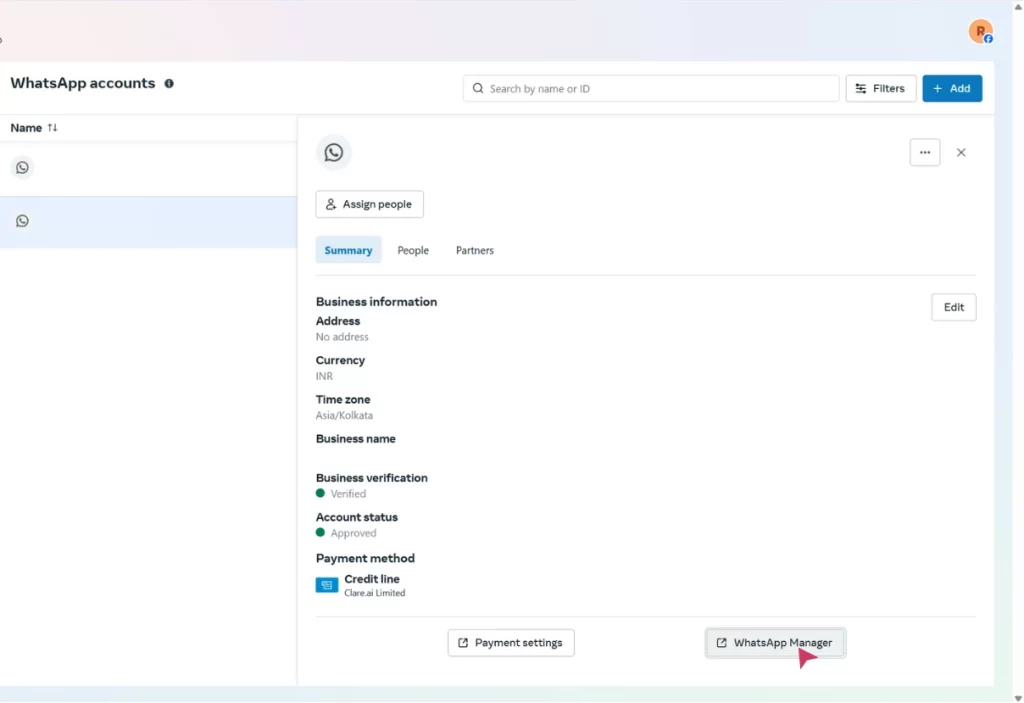
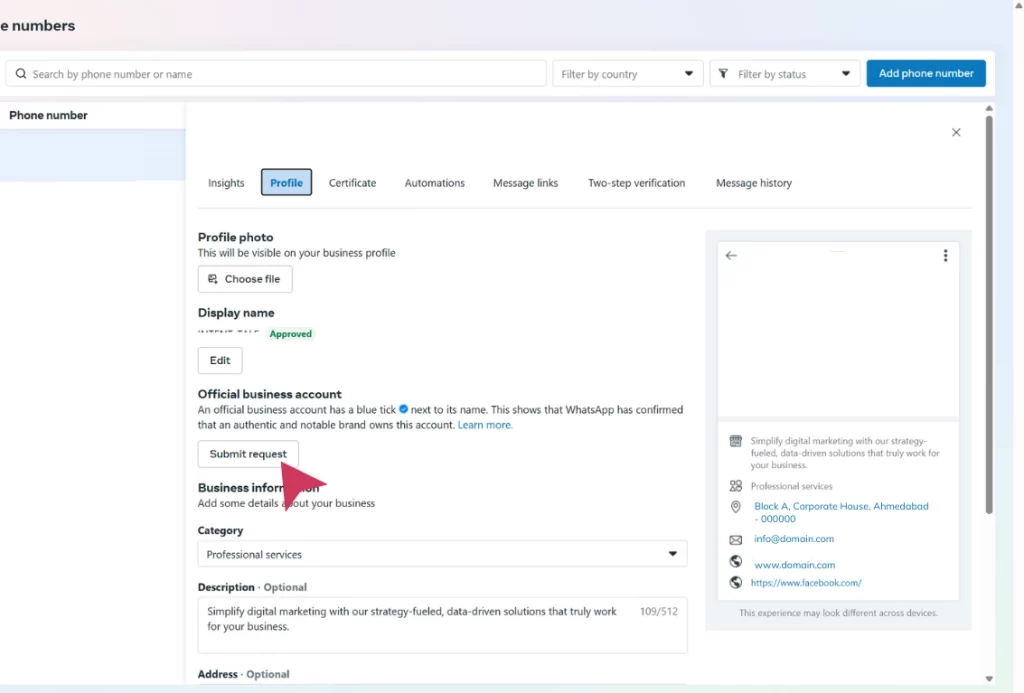
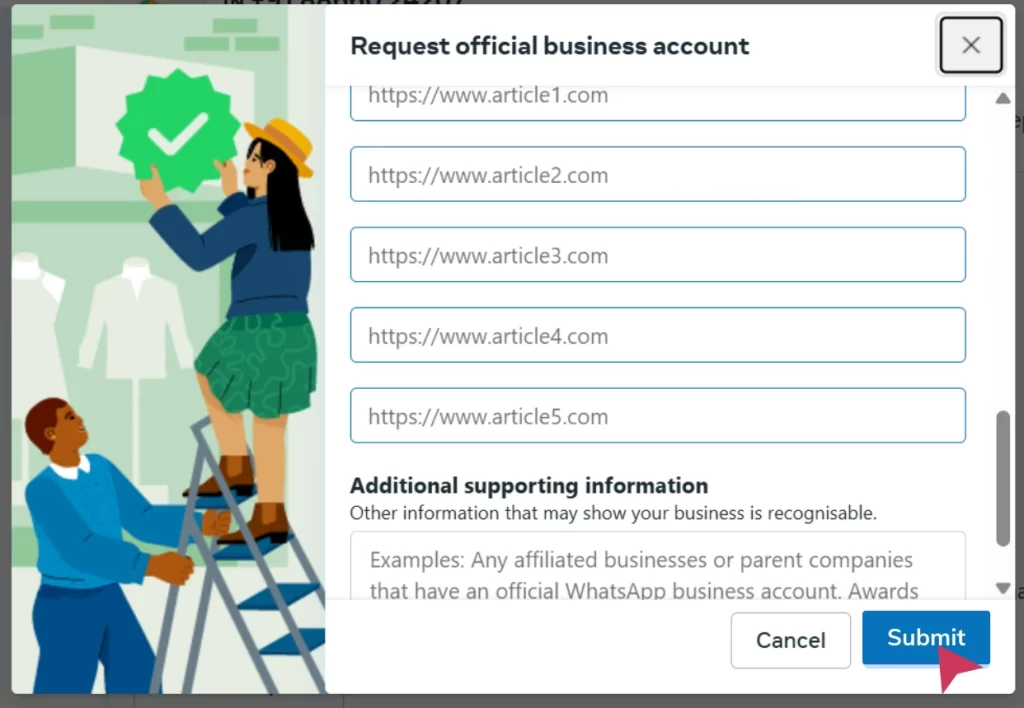
Note: Organic verification is free but limited to businesses with notable public recognition.
2. How Can Businesses Get a WhatsApp Blue Tick with a Meta Verified Subscription?
If you’re a small business and want a simpler way to get verified, Meta Verified is your solution. This paid program provides a WhatsApp Blue Tick, even if you’re not a publicly notable brand.
To apply via Meta Verified, your business must:
- Have an active WhatsApp Business profile
- Be located in India, Brazil, Indonesia, or Colombia (as of now)
- Include a profile photo and business display name
- Not have an existing Meta Verified or WhatsApp Premium subscription
- Comply with Meta’s Business & Commerce policies
What Are the WhatsApp Meta Verified Subscription Plans & Pricing (India)
Source: Official WhatsApp Meta Verified FAQ
WhatsApp Meta Verified is a subscription-based service that offers a verified badge, enhanced security, and additional business features. The pricing for Meta Verified may vary based on region and plan selection.
Available Subscription Plans:
WhatsApp provides different plans based on business needs, but exact pricing is not publicly disclosed. Here are the key features included in Meta Verified plans:
| Plan | Features |
|---|---|
| Business Standard | Verified badge, impersonation protection, one verified channel, a custom web page, customer support, and multi-agent access with up to four linked devices. |
| Business Plus | Includes Business Standard benefits, plus additional verified channels and extended linked devices. |
| Business Premium | Includes Business Plus benefits, enhanced support, more verified channels, and protected business accounts. |
| Business Max | Highest-tier plan with the maximum number of verified channels, protected business accounts, priority support, and additional business features. |
Note: Pricing may vary depending on your location. To check the exact price for your region, open the WhatsApp Business app and navigate to the “Meta Verified” section.
How to Subscribe to WhatsApp Meta Verified in a Few Easy Steps?
- Open WhatsApp Business
- Tap the Meta Verified option
- Choose a plan that fits your business
- Complete your subscription
You can follow the official process to subscribe to Meta Verified on WhatsApp Business by referring to this step-by-step WhatsApp FAQ guide, which explains eligibility, setup, and subscription details directly from Meta.
Benefits of Getting the WhatsApp Business Verified Badge
- Builds instant trust and credibility with customers
- Protects your brand from impersonation
- Enhances engagement and response rates
- Boosts visibility in customer chats with an official label
- Reinforces your brand’s legitimacy across Meta platforms
Getting the official WhatsApp Business Verified Badge is more than a visual tick; it’s a powerful trust signal that sets your business apart.
Here’s a quick comparison to help you choose the best route depending on your business size and how you prefer to get Blue Tick on WhatsApp.
WhatsApp Blue Tick Verification – Free API vs Meta Verified
| Feature | API Verification (Free) | Meta Verified (Paid) |
|---|---|---|
| Cost | Free | Paid (subscription) |
| Eligibility | Public figure / known brand | Any small business |
| Process | Manual request via Meta | In-app subscription |
| Requires Press Mentions | ✅ Yes | ❌ No |
| Requires API Access | ✅ Yes | ❌ No |
| Badge Color | ✅ Blue | ✅ Blue |
| Ideal For | Enterprises, public brands | SMBs, startups |
Choose API verification for full control and no cost, or Meta Verified (Subscription-based Blue Tick) for speed and ease, based on your business type.
Whether you opt for free API verification or the paid Meta Verified badge, choosing the right option depends on your business size, needs, and goals.
We’ve helped several businesses across India successfully complete the WhatsApp verification process, including brands in Ed-tech, pharma, interior design, and beauty. Whether you’re a startup or an enterprise looking for WhatsApp marketing in Ahmedabad or PAN India, we can support your verification journey from end to end.
WhatsApp Blue Tick – Which Route is Right for You?
| Business Type | Best Option | Why |
|---|---|---|
| Small Businesses | Meta Verified | Fast, no press required, app-based |
| Notable Brands | WhatsApp API | Free, but only for public-facing brands with proof |
| Agencies/Startups | Either (based on budget + goals) | API if you want control; Meta Verified if you want speed |
Watch: How to Get the WhatsApp Blue Tick (2025 Guide)
This video walks you through the complete WhatsApp Blue Tick verification process, including API-based verification and Meta Verified subscription. It’s a great visual summary of what you’ll learn in this blog.

Key Takeaways:
- Step-by-step walkthrough of the WhatsApp API Blue Tick verification process.
- Understand the requirements for Meta Verified via the WhatsApp Business app.
- Visual comparison of free vs. paid verification options.
- Best suited for startups and small businesses looking to build trust on WhatsApp.
Mistakes First-Time Applicants Often Make
- Skipping press mentions (API only): You need 4–5 credible news articles for Meta to consider your business “notable.”
- Unverified Meta Business Account: Ensure your business is fully verified in Meta Business Manager before applying.
- Wrong or inconsistent display name: The WhatsApp display name must exactly match your legal brand name registered with Meta.
- No two-step verification: Without this security step, WhatsApp will auto-reject the verification request.
- Applying while on another Meta plan: You can’t subscribe to Meta Verified if your account is already on Premium or another subscription.
Pro Tip: Search your brand name on Google. If you don’t see any mentions, work on PR or directory listings before applying.
What are the Common Reasons for WhatsApp Blue Tick Rejection?
Getting rejected during the WhatsApp Business verification process can be frustrating, but it’s often due to one or more of the following issues:
- Insufficient public visibility – No or limited press mentions for the API route
- Unverified Meta Business Account – Not completing the verification flow
- Display name mismatch – Your business name doesn’t match your brand identity
- Missing two-step verification – This is a strict requirement for security
- Violation of WhatsApp’s commerce or business policies
- Trying to subscribe to Meta Verified while already on Premium or another plan
Many of our clients initially faced roadblocks like press coverage gaps or Meta Business verification delays. Through our optimization strategies, we’ve helped brands like Zuvius Lifesciences, Star Makeup Academy, and Cybersecurity Training Centre overcome these hurdles and get verified successfully.
Is WhatsApp Verification Worth It for Your Business?
No matter your size or industry, if you’re serious about credibility and reach, knowing how to get Blue Tick on WhatsApp can give you a competitive edge.
If you’re eligible for organic verification, applying is a no-brainer. If not, WhatsApp’s paid verification is a great option for smaller businesses looking to stand out.
Want to get more out of WhatsApp for your business? Check out these related guides:
How to Set Up a WhatsApp Chatbot integrated with [payment gateway – Automate customer interactions and streamline support
Meta Ads + WhatsApp Chatbot – Build click-to-WhatsApp ad funnels that convert
Industries Using WhatsApp Marketing – See how pharma, ed-tech & beauty brands use it
If you’re looking for a trusted provider of WhatsApp marketing in Ahmedabad, our team has helped brands across ed-tech, pharma, beauty, and more get their WhatsApp Business accounts blue tick verified with ease.
If you’re wondering how to get Blue Tick on WhatsApp for your business, the process is simpler than you think.
Businesses We’ve Helped Get Verified on WhatsApp:
- Zuvius Lifesciences (Pharma)
We helped this pharmaceutical company establish a stronger digital presence by earning the WhatsApp blue tick. This improved trust in customer interactions and positioned them as a leader in healthcare.
Read the full case study - Cybersecurity Training Centre (Ed-Tech)
By securing WhatsApp verification, CSTC enhanced its authority in the competitive ed-tech landscape, improving engagement with students and corporate clients alike.
Read the CSTC case study - Smiloshine (E-commerce)
We enabled Smiloshine to gain customer credibility by helping them earn the blue tick, ultimately leading to increased conversions and trust in a crowded e-commerce space.
Read the Smiloshine case study - Arise Intensity Academy (Education)
Our WhatsApp verification strategy helped Arise Intensity stand out in the education industry, giving their brand more legitimacy and improving outreach to parents and students.
Read the Arise case study - Star Makeup Academy (Beauty)
Star Makeup Academy overcame online trust barriers with a verified WhatsApp presence, boosting appointment bookings and client engagement.
Read the Star Academy case study - MakeSpace Interior (Interior Design)
This client faced multiple challenges with WhatsApp verification. We guided them through the process to secure the blue tick, enhancing their premium image and client communication.
Read the MakeSpace case study
Whether you’re based in Ahmedabad or scaling across India, we’ve supported businesses in pharma, beauty, ed-tech, and interiors with verified WhatsApp Business badge setups.
Need help getting verified? Contact our team to fast-track your WhatsApp Business badge. Read our Commitment to Data Privacy.
Recommended Reading:
Get Blue Tick on WhatsApp – Everything You Need to Know
How do I get a blue badge on WhatsApp?
To get a blue badge on WhatsApp, apply for Meta Verified via the WhatsApp Business app or use the API-based method. You’ll need a verified Meta Business Account, meet eligibility criteria, and submit the required documents. Meta then approves and applies the badge if you’re eligible.
What is Meta Verified on WhatsApp?
You need a WhatsApp Business account, a verified Meta Business profile, and either meet notability standards (for API) or subscribe to Meta Verified.
What are the eligibility criteria for WhatsApp Business Verification?
To be eligible for WhatsApp Business verification, you must have an active WhatsApp Business account and a verified Meta Business profile. API users must be publicly notable, while small businesses can subscribe to Meta Verified if they meet basic requirements.
What are the common reasons for Blue Tick rejection?
WhatsApp verification is usually rejected due to low public visibility, missing press mentions (for API), an unverified Meta account, two-step verification not enabled, or display name mismatches.
Does WhatsApp charge a fee for blue tick verification?
Meta Verified is a paid subscription. WhatsApp API-based verification is free but available only to eligible and notable businesses.
How long does it take to get verified on WhatsApp?
Meta Verified approvals can happen quickly, while API-based verifications may take several days depending on documentation and eligibility.
Can individuals get a blue tick on WhatsApp?
No, WhatsApp blue tick verification is only available for businesses. Personal accounts are not eligible for the verification badge.
Is WhatsApp Blue Tick safe?
Yes, the blue tick confirms the account is verified by WhatsApp or Meta. It helps users trust that they are interacting with a legitimate business.
Is there customer support for WhatsApp Blue Tick issues?
Yes, businesses can contact Meta Business Support for assistance with verification issues.
Is WhatsApp Blue Tick available worldwide?
WhatsApp API-based verification is available globally. Meta Verified is currently available only in select countries like India, Brazil, Indonesia, and Colombia.
Can a business lose its WhatsApp blue tick badge?
Yes, if the business violates WhatsApp policies, becomes inactive, or cancels its Meta Verified subscription, the badge can be revoked.
What happens if my WhatsApp verification request is rejected?
You can reapply after improving your business visibility and correcting any issues. Ensure your brand meets eligibility and has a strong online presence.
API users don’t see the “Submit Request” option. Why?
Meta requires an internal review before enabling API-based verification for your account. If you don’t see the option, your account hasn’t been approved yet; only approved businesses can click “Submit Request.” API users cannot opt into the paid Meta Verified service.
Bonus: WhatsApp Blue Tick Tips From Experts
Quick-fire list like:
Use brand-matching display names
Get press coverage before applying (API route)
Never violate Commerce Policies
Set up 2FA before starting verification
About Intent Tale
Intent Tale is a results-driven digital marketing agency that helps startups and small businesses grow through smart content, automation, and WhatsApp marketing strategies. Our team has helped dozens of Indian brands successfully earn their WhatsApp Business verification badge.
Want to grow faster with WhatsApp? Get in touch or explore our insights.